eScoring
Always use the latest version of GliderScore for eScoring.
GliderScore provides for remote score input by smartphone.
Here is how it works
Here is a short video contributed by Mike Vos that explains eScoring very well.
- The competition is created on the PC.
- Data is sent from the PC to the GliderScore server.
- Pilots access their data from the server and enter scores.
- When a pilot taps 'Submit', their score is sent to the server.
- The scorekeeper downloads scores from the server to the PC.
- Score calculations happen automatically.
- When all scores are in for a round, the scorekeeper re-uploads the data.
- This puts up-to-date results onto the server.
- The pilots can now see their current ranking and scores.
There is no direct connection between the PC and the phones.
- The PC sends to the GliderScore server and receives from the GliderScore server.
- The phones send to the GliderScore server and receive from the GliderScore server.
Why use this system?
- Reduced chance of errors from poor writing.
- The QRCode has to be scanned only once.
- Pilots/officials can enter scores at the landing spots.
Memory lapse errors are eliminated.
- No more time wasting trips along the flight line to submit scores.
- Fewer delays from gathering scores. Entry is quick and easy.
- Built in checks to ensure validity.
- Can continue with manual scoring if all else fails.
- Pilots can review their scores on their phones.
Available for all glider competitions.
F3B F3F F3K F3J F3Q F5B F5J Thermal Electric
As organiser, you will take these steps. More details in following tabs.
- Make sure that the flying field has good mobile/cell phone coverage.
If coverage is poor for some ISPs, you might have to establish a wifi hotspot.
- Create the competition and the draw as usual.
Make sure that all the scoring parameters are set correctly.
These parameters will be uploaded.
- Make sure that the QRCode Setup is correct for eScoring.
You only have to do this once.
- Print the Score Record cards.
These provide a QRCode that, when scanned, connects pilot to the server.
- Upload the data to the server.
- Download scores once the competition gets under way.
- Check for missing scores.
- Publish results.
Go to the For Organisers tab for more detailed information.
As a pilot, you will
- Bring a smartphone to the competition.
The phone must have a QRCode scanning app installed.
- Android phones
- QR Droid is very good.
- iPhones
- You can use the built in feature of the iPhone camera.
- Chrome for IOS sounds good.
It has a built in QR scanner and tabs that should make
handling multiple pilots on the one phone very easy.
- Opera Mini for IOS sounds good.
It also has a built in QR scanner (button is in the address bar).
- Scan the QRCode that is on your Score Record.
This logs you in to the server and loads your master scoring page in your web browser.
This web page takes you to an individual scoring page for each flight.
- After each flight
Write your score details on your Score Record.
Enter your scores on the phone and press 'Submit'.
Go to the For Pilots tab for more detailed information.
eScoring for Pilots
In this section
- Scanning the QRCode
- Entering scores with smartphone
- Entering scores with a shared computer
- Entering scores using any shared device
- Scoring example for F3K
- Scoring example for F3B
- View Results on smartphone
Pilots need a smartphone with a QRCode scanning app installed.
Those without a smartphone can use a 'communal' computer (see below).
I have found QRDroid to be excellent on Android.
For iPhone/iPad, the built in scanner should work. Otherwise Quick Scan is worth trying.
There is no other software required provided the phone has a web browser installed.
Pilots also need their Score Record with their QRCode.
Scanning the QRCode
When the pilot scans the QRCode, it takes him to a web page like this.
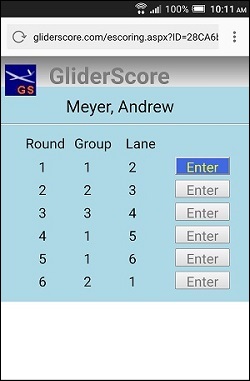
The pilot can see exactly when he is drawn to fly.
- For F3K and F5K the task is shown against each round.
- For F3B Distance, the ID is shown.
- For F3B, F3F and F3Q Speed, the flying order is shown.
- Where Lanes are used, the Lane is shown.
Only one flight group is open for score entry.
A score must be entered for the open flight group before
the next one will become available.
Pressing the 'Enter' button takes the pilot to the score entry screen.
Entering scores with smartphone
There are separate screens designed for each competition type.
With F3J there will be a 'Late Landing' box.
With F5J there will be a 'Height Penalty' box.
F3K, F5B and others all have their own special screens.
When the pilot scans the QRCode, it takes him to a web page like this one (on the left).
This page is for F3J.
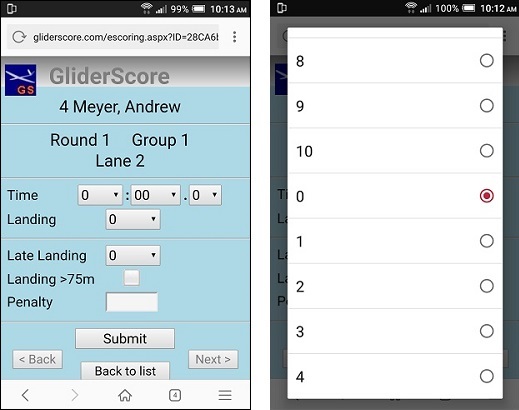
There are dropdown boxes for minutes, seconds, landing and late landing.
What is not so obvious is that these
dropdown boxes scroll both ways.
So, if you want a high value, pull down.
As the image on the right shows, the initial
value of zero is actually in the middle of a
double list of possible values.
You can enter a zero score with this form.
Press Submit and you will be asked to
confirm by pressing Submit again.
This will record the zero score.
- Tap the '< Back' button to go to
the previous score entry page.
- Tap the 'Back to list' button to go to
the list of Rounds/Groups.
- Tap the 'Next >' button to go to
the next score entry page.
The Back and Next button are enabled or disabled depending on circumstances.
Entering scores with a shared computer
You can set up a separate computer (connected to the internet) for pilots who do not have smartphones.
Pilots will be able to enter their scores by using a small program called eScoringInterface.exe.
This program can run on any internet-connected PC. It does not need GliderScore on the PC.
It can be in any folder.
eScoringInterface.exe is available for download by clicking this button.
Running eScoringInterface.exe brings up this screen.
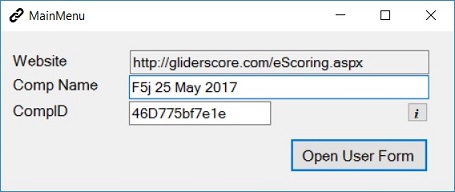
Key in a name for your competition and the CompID.
The CompID can be found on the Score Record cards.
Click on 'Open User Form' to see this screen.
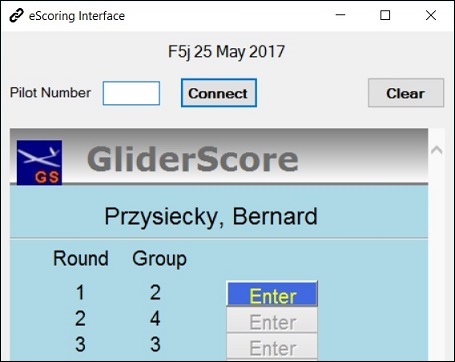
The pilot enters his pilot number (from the QR Code
string on his Score Record card) and clicks
on 'Connect'.
His scoring screen opens and from this point
he can interact with it in exactly the same way as
he would if using a smartphone.
When finished he clicks on 'Clear' to clear
the screen, ready for the next person.
Closing this form closes the program.
Entering Scores with any Internet Connected Device
This method can be used for any internet connected device, including a PC.
It is suitable when several pilots share the same device.
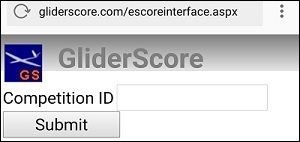
Log on to gliderscore.com/escoreinterface.aspx
Logging on brings up this screen. Enter the CompID from any Score Record and press Submit
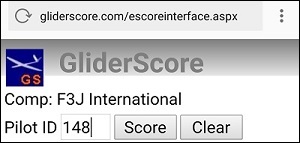
You will then have this screen where you can enter any Pilot ID.
The Pilot ID is the number at the end of the QR Code string on the Score Record.
Press on 'Score' to get the pilot's scoring screen.
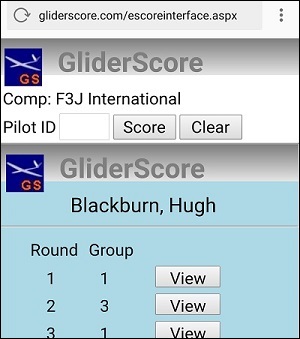
From here the pilot can select the round for scoring
and go ahead and enter scores.
Enter another Pilot ID to see their scoring screen.
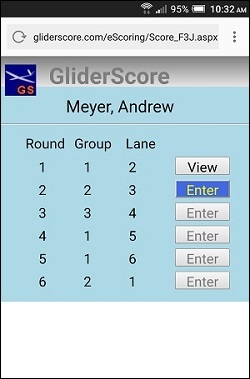
After entering scores for a round, the scoring screen for the next round becomes available.
You can View scores for previous rounds or Enter scores for the next round.
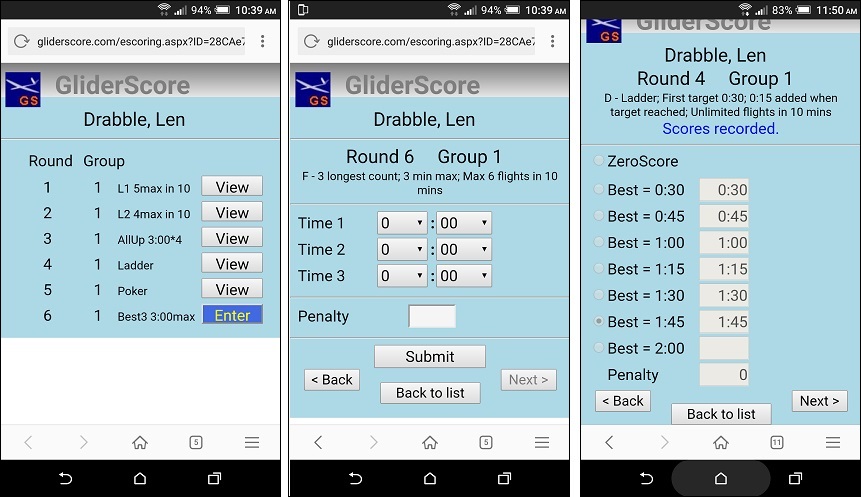
Scoring example for F3K
The right hand image is the score entry form for Task D.
One tap fills in all the scores up to the button tapped.
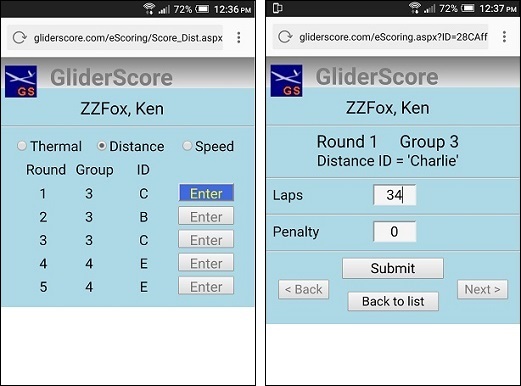
Scoring example for F3B (F3Q is very similar)
View Results on Phone
Details of the pilot's flight group are always available.
Initially all flight group pilot scores are zero. As scores are submitted, a refresh of this screen will show the submitted scores.
The system also shows the Points total at this stage.
Normally, at the end of scoring for a round the CD will upload results to the server.
That way they are available to all pilots.
This updates the flight group data with the normalized scores and the progressive position of every pilot.
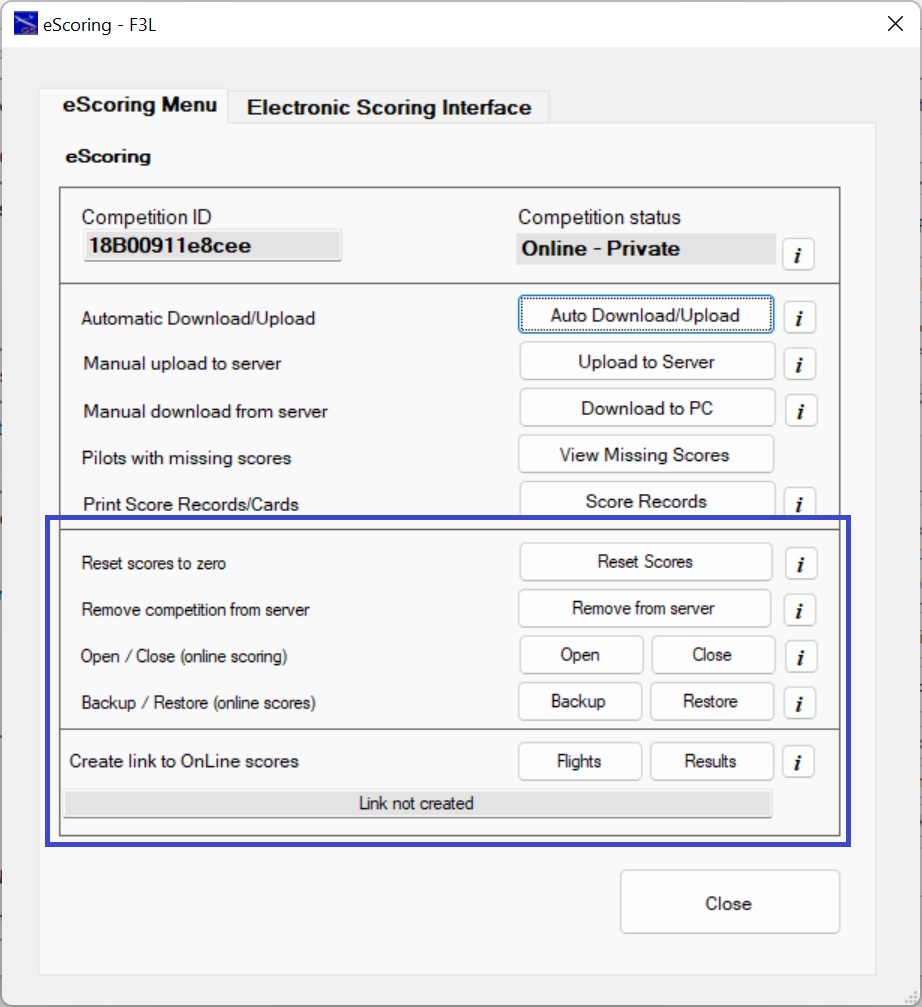
eScoring - Other Options
In this section
- Reset scores to zero
- Remove competition from server.
- Open / Close (online scoring)
- Backup / Restore (online scores)
- Create a link.
- Pilot List with eScoring URL (QR Code String)
Reset Scores to Zero
Resets score values to zero from and including a selected
round and group.
This can be for the whole competition.
The reset happens optionally with -
- the on-line database
- the local database
- both databases
Using this process, you can allow all pilots to practice
on-line score entry before a competition. Then, before
the competition begins, make all scores zero in readiness
for entering the real scores.
The process can also be used, particularly at competitions
that run for more than one day, to clear scores from a
particular round and group to the end of the competition.
This may be needed if pilots enter scores overnight by mistake.
Remove Competition from server.
Use this to remove all traces of the competition from the server.
Open / Close (online scoring)
Allows control of exactly when pilots can and cannot enter scores.
- Close online scoring at the end of the day's flying.
- Open online scoring at the start of the next day's flying.
Open
When clicked, allows score entry by mobile 'phone to proceed as normal.
Internet connection required.
Close
When clicked, prevents score entry by mobile 'phone.
Internet connection required.
Backup / Restore (online scores)
Backup
Create a backup copy of ALL score data for the competition.
If there is a pre-existing backup, you
will be asked to confirm before overwriting it.
Restore
Backup data can be restored to the main data table at any time.
All data in the main data table will be replaced with the backup data.
Create Link
Use this to generate a link that you can share via email or the web.
The link, when clicked, will open up your competition on-line without having to find it using the drop down list.
Links can be generated to go to the on-line Flight scores or the on-line Results.
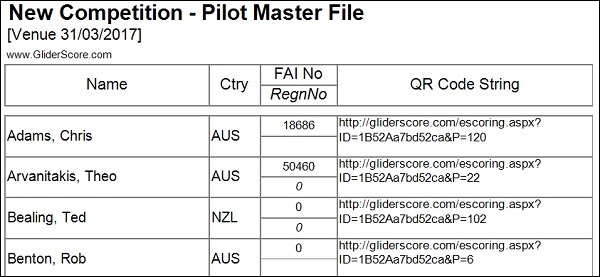
Pilot List with eScoring URL (QR Code String)
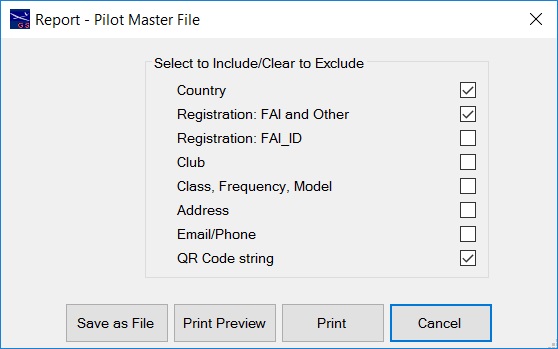
A full list of pilots in the competition and their eScoring URLs is available from the Reports Menu.
Reports → Pilot Reports → Pilot Master File.
With this report you can select to print or download the eScoring URL (QR Code String) as shown below.
Report Selections
Report Output
About eScoring
This module in GliderScore came about after it was suggested to me by Jim Monaco.
Jim provided support and invaluable advice to get me going and without his help
getting the project started would have been much more difficult.
At the time I was in contact with Chris Bajorek and he enthusiastically agreed to be
a tester. He has been fantastic with suggestions along the way and has stuck with it
even though at times it wasn't looking so good. The amount of time and effort that he
has put into it has been enormous.
Chris spread the word to Lee Wolfe who also came aboard as a tester. He has perhaps
been the bravest of us all. He put the system into use in actual competitions long
before I thought it was ready. But this proved to be invaluable thanks to the great
feedback and suggestions from the pilots. The form of many of the user interface elements
are due to their suggestions.
A person who will be surprised to be mentioned here is Marcus Stent. He made one comment
that sparked a change in direction. He commented "Is there anything to prevent scores
being entered in the wrong round?". At the time the method of entry was to scan a QRCode
from a score card, so my answer was no, there was nothing to prevent that. This led to the
page that lists the flight groups in order and only allows the next flight group without
scores to be opened for scoring. Thanks Marcus.
Fairly late on the scene was Fabien Gagné. He joined our little testing group and immediately
put the system into use in actual competition. I should say that this was in Canada and his
winter competition started and finished in sub-zero conditions. His input has also been very
valuable.
The person who is to be thanked the most however is my wife, Helen.
She has been extremely understanding and supportive of me while I worked away for long hours
on something that I was very determined to finish. She kept the house going while I did
nothing other than sit at the computer and beaver away at the project.
So thank you my darling.
Also worth mentioning are all the people who have posted answers to questions or created
lesson materials on all aspects of programming.
At the start of this process I knew very little, actually nothing, about creating an interactive
web application. I now know a lot more, but still very little really.
Without these people who willingly share their knowledge this would never have been finished.
And finally Microsoft.
Microsoft provides, for no charge, the amazing program Visual Studio 2015 that was used to create
this eScoring system (and GliderScore and Digital Timer). For server side management they also
provide SQL Server Management Studio, again, for no charge. This is another fantastic program
that makes interacting with the on-line database for development purposes easy. It provides all the
tools that I need.
Thank you Microsoft. Without your generosity this would not have happened.
Gerry Carter
March 31, 2017