Email Reports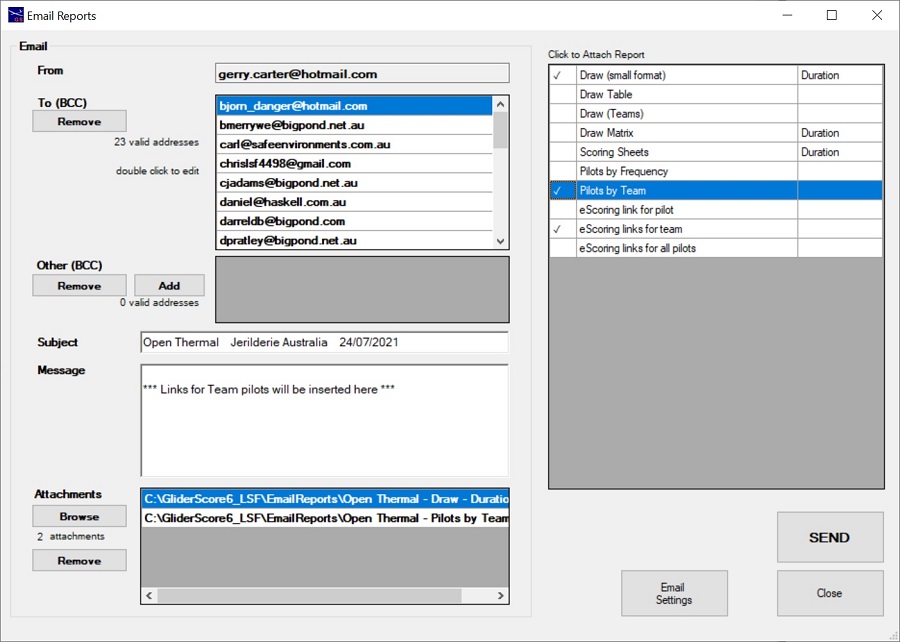
This screen is accessible from the Competition setup screen.
- Automatically fills in email addresses for the competition pilots.
- Lists all available reports that can be attached. Click to attach.
- Allows browsing for other files and attaching them to the email.
These could be photos, PDF versions of the reports (that you create yourself) or
anything else at all.
- Allows copies to be sent to others.
- Allows space for a message.
- All pilots are listed. Missing or invalid email addresses
can be edited on this screen. Changes are saved on the pilot master file record.
- A copy of the email is sent to your nominated email address so that you have a record
of what was sent.
- All downloaded reports are deleted when you close the screen.
Click the Email Settings button to create and save
the settings needed to send your email.
See below for details about Email Settings.
Email Settings
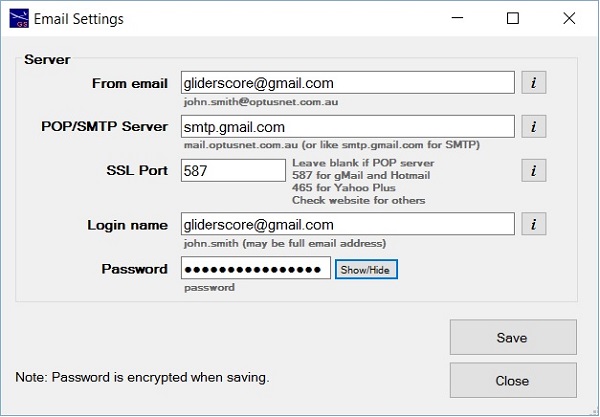
These settings depend on the email service that you want to use.
It may be the service provided by your internet service provider or a service provided by Google (gMail), Hotmail or similar.
If provided by your internet service provider -
- your email address will be of the form my.name@internetprovider.com.
- your POP/SMTP Server name will be of the form mail.internetprovider.com.
- there is no need to enter anything in the SSL Port field.
- your login name and password are the same as you would normally use to log on to your email account.
If you want to send using your gMail, Hotmail or similar account -
- your email address will be of the form my.name@serviceprovider.com.
- your POP/SMTP Server name will be of the form smtp.serviceprovider.com.
- the SSL Port field value is whatever your service provider specify for this purpose.
- with the exception of gMail, your login name and password are the same as you would normally use to log on to your email account.
- for gMail your login name is your usual login name and the password is a specially generated 'app password' (see below).
This information is saved on your computer and used for sending the emails that you create.
Your password is saved in encrypted form to protect your privacy.
You can change these settings at any time.
About gMail and the 'App Password' ..........
Google require two extra steps to send emails from a gMail account.
- Turn on 2-Step Verification, and
- Generate an App Password (to use instead of the usual password)
Log in to your gMail account and click on the cog wheel for settings -
- Navigate to Settings→Accounts and Import→Change Account Settings→Other Google Account settings.
- Activate 2-Step Verification
Go to Sign-in and Security→Signing in to Google→2-Step Verification
- Generate an App Password
Go to Sign-in and Security→Signing in to Google→App passwords
In GliderScore, use the App Password that was generated instead of your usual password.
Save your settings. Send your email!
Pilot Email Addresses
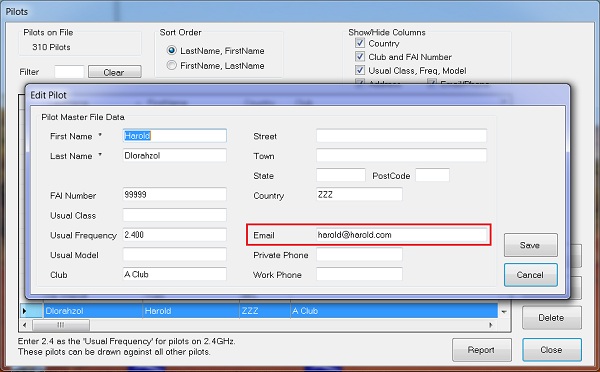
Click on Pilots on the Main Menu to access the pilot records.
This is where the email addresses are saved.
When you go to Email Reports, the email form is automatically filled
with addresses from the Pilots file.