Frequently Asked Questions
Click on text to Show/Hide answers.
1. Can I run a competition with pilots flying two classes of model?
Yes.
There is more information here.
As an example, we want to allow pilots to fly ALES and Legacy class models
in the one competition.
The two classes are to fly at the same time in mixed class groups.

On the Competition Setup screen -
- Select 'Use Teams?'
- Select 'Use Classes?'
- Select 'Team Protection?'
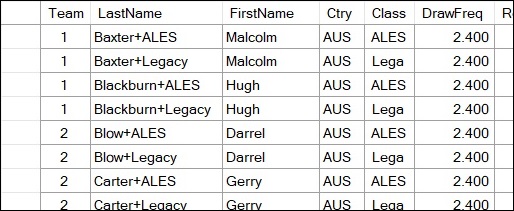
In the Pilot Entry screen -
- Create two Pilot entries for each person that enters for both classes.
Append the Last Name with the class like this
Baxter+ALES
Baxter+Legacy'
The class field is automatically filled in when the pilot is entered.
- Enter both into the competition AND put both into their own
two person 'team' so that they will be in different flight groups.
- If a pilot enters for only one class simply enter them into the competition
as normal and type in the class code for which they have entered.
- The Class code is for reporting only and does not effect the draw.
- Finally, create the draw.
Team protection takes care of keeping pilots entered in both classes separated in
the draw.
The class code will show on the reports.
This makes things clear for pilots who entered in only one class
but did not have their names modified.
2. Can I run a thermal duration competition with target times changing from round to round?
Yes.

Step 1. Set the default target time in the Competition setup screen.
This is used unless a different target time is set in the Scoring screen.
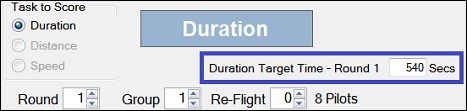
Step 2. In the Scoring screen there is provision to override the default target time.
Change the Target Time for each Round as needed.
The target time entered applies for the whole round. All scores for the round
are automatically adjusted if you change the target time.
3. Can I produce a Team Result where only nominated team members qualify for the
result?
Yes.
Normally, GliderScore takes the top 'n' pilot scores from each team for the final
team result.
You nominate how many pilots from each team are to count for the team result.
What you need to do in this case is a little different.
In this case a team comprises both 'helper' pilots and 'team' pilots, but
only the scores of the 'team' pilots are to count for the team result.
The steps to take are -
- Enter all team members, including helpers, under a unique team number.
- Create the draw and run the competition.
- Before producing the final team report, change all 'helpers' to new team numbers
so that each 'helper' has his/her own unique team number.
- Produce the final team report.
It is important to leave the change to the team numbers until the competition is
finished.
By taking this approach, GliderScore is able to help avoid team clashes in the event
of a re-flight.
4. Can I run a World Championship where the defending champion will fly with his country's
team members?
Yes.
You need to -
1. avoid the defending world champion being drawn against pilots from his country's
team, and
2. exclude the defending world champion's score from the teams result.
The steps to take are -
- Enter all team members, including the defending world champion, under a unique team
number.
- Ensure that 'Team Protection?' is selected.
- In the Pilot Entry screen there will be a column headed OTS.
This means Omit from Team Score.
Place a tick in this column against the entry for the defending world champion.
The defending world champion will be excluded from Team results.
- Create the draw in the normal way. Team protection keeps team members in separate groups.
5. Can I use channel numbers instead of actual frequencies?
Yes.
Pilots having the same channel number will be drawn in different flight groups.
If you use channel numbers you need to be aware of these points -
- Always specify 2.4 as the frequency for pilots on 2.4GHz.
- The '20KHz Spacing' functionality will not work for channel numbers.
6. I want to draw 3 Groups per Round but GliderScore won't allow less than 5. Why is this?
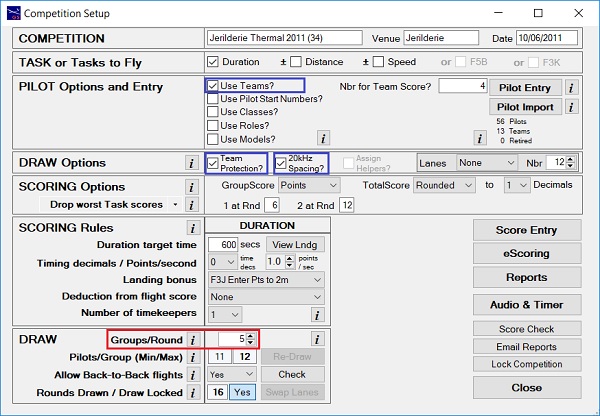
If you are having issues with the minimum Groups/Round, check the number of pilots
in each team (if using teams) and the number of pilots on each frequency.
To explain, GliderScore adjusts the minimum allowable Groups/Round according to your settings.
If 'Use Teams?' AND 'Team Protection?' are selected, the minimum Groups/Round will
be the greater of
- The count of pilots in the largest team.
- The count of pilots on the 'most used' frequency (except 2.4GHz)
Otherwise, it will be
- The count of pilots on the 'most used' frequency (except 2.4GHz)
What qualifies as the 'most used' frequency can depend on whether '20kHz
Spacing?' is selected.
For example, pilots on 35.010 and 35.020 would be counted together since, with '20kHz Spacing?' selected,
they cannot be drawn in the same group.
7. Can I run two (or more) instances of GliderScore at the same time?
Yes.
You might want to do this to run two different competitions at the same time, or
you might want to keep a particular screen open to avoid having to navigate to it each time,
for example, the Reports screen.
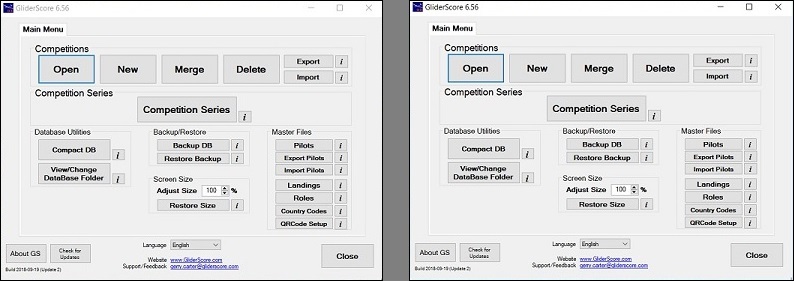
Start by opening the two instances of GliderScore as shown below.
Any window that you open will be centered (as nearly as possible) on the centre of the Main Menu screen.
You can tell which competition is open by looking at the top of the currently open screen.
The competition name is there to help you.
You can only run one instance of the Digital Timer at any one time (from either instance).
However, if you have the same competition date for both competitions, it is possible to create
a merged Playlist that covers both competitions. If you do this then one instance of the Timer will
handle the audio for both competitions.
For more information look under the Display/Timer/Audio tab.
8. Does GliderScore write data anywhere outside of the C:\GliderScore6 folder?
Yes.
GliderScore stores your preferences in special folders.
It saves preferences that apply every time that you use GliderScore and not just for the current session.
One example is the re-sizing of a form. The re-sizing preference is saved for next time.
The location of the GliderScore.exe saved data is -
C:\Users\YourUserName\AppData\Local\GliderScore.
The Digital Timer also saves preferences such as COM port settings in its own folder -
C:\Users\YourUserName\AppData\Local\GliderScoreDigitalTimer.
You can safely delete these two folders at any time.
If the folders have been deleted, when you next use the program the folders will be regenerated and
any previously saved preferences will be replaced by the default values.
9. Can I set up a backup computer in case my primary computer fails?
Yes.
Special Folders
- In both of the two cases below, there are two special folders that need to be copied onto the backup computer.
- They are:
C:\Users\YourUserName\AppData\Local\GliderScore, and
C:\Users\YourUserName\AppData\Local\GliderScoreDigitalTimer.
- These folders store your GliderScore settings/preferences including the COM port settings for the Timer program.
- It is not sufficient to have these folders on a USB drive. To be effective they have to be on the backup computer.
If using eScoring
- The rule is that everything to do with the competition must be done using exactly the same data
- on both computers.
- In setting up the backup computer, an exact copy of the original GliderScore6 folder must be used.
- This means that everything, including all of the audio files, will be available.
- It also guarantees that the Comp ID and the (internal) pilot numbers are the same on both computers.
- Copying the complete GliderScore6 folder is the only way to achieve this.
- When you are satisfied about everything on your primary computer (competition setup, the pilots, the draw)
- copy the entire C:\GliderScore6 folder to a USB drive.
- You can run GliderScore from the USB drive after inserting it in the backup computer or
- you can copy the complete folder from the USB drive to the backup computer.
- In either case you may need to use the Main Menu option 'View/Change DB Folder' to navigate
- and connect to the desired database.
- Exporting the competition and importing it on the backup computer will not work.
- The CompIDs and the (internal) pilot numbers will be different on each computer.
- The backup computer will not be able to access online data uploaded from the primary computer.
If not using eScoring
- When you are satisfied with everything on your primary computer (competition setup, the pilots, the draw)
- use the Main Menu 'Export' option to export the competition to your selected folder.
- Copy the file created by the Export function to the backup computer.
- On the backup computer use the Main Menu 'Import' function to import the competition to
- the GliderScore database.
- You may not have all of the necessary audio files but GliderScore will create any that are missing.
- The imported competition will have a new CompID but this does not matter because eScoring is not being used.
10. Can I transfer GliderScore to a new computer without losing anything?
Yes.
This FAQ deals with the situation where your current computer is being 'retired' from GliderScore duties.
Instead, a new computer is to take over the running of GliderScore.
There is one folder that has to be to be copied across to the new computer and
two folders that are optional.
The easiest way to move the folders is to use a USB drive.
C:\GliderScore6
This is the folder that has to be copied to the new computer.
Copy the C:\GliderScore6 folder from the old computer onto the USB drive.
Copy the GliderScore6 folder from the USB drive to the new computer's C drive.
At this stage you can use GliderScore on the new computer. However there is more that can be done.
C:\Users\YourUserName\AppData\Local\GliderScore
C:\Users\YourUserName\AppData\Local\GliderScoreDigitalTimer
Copying these two folders to the new computer is optional.
GliderScore stores your preferences in special folders.
It saves preferences that are applied every time that you use GliderScore.
One example is the re-sizing of a form. The re-sizing preference is saved for next time.
Another example is the Email settings that you create.
The location of GliderScore's saved preferences is -
C:\Users\YourUserName\AppData\Local\GliderScore
The location of DigitalTimer's saved preferences including COM port settings is -
C:\Users\YourUserName\AppData\Local\GliderScoreDigitalTimer
Locate the two folders on your old computer.
They may be hidden folders so you might have to un-hide them.
Copy these folders from the old computer onto the USB drive.
Copy these folders from the USB drive into the equivelant location on your new computer.
You can now run GliderScore on the new computer and it will behave exactly as it did on your old computer.