Translate into any language
GliderScore can translate practically everything on screen (and on
reports) into ANY language.
From Version 6.51, all translation files are included with the full download.
The same files are available for download at the end of this page.
After download, they should be moved to the C:\GliderScore6\Translations folder.
There is only one requirement to make this all happen.
- The language files MyLanguage.lng must be in a sub-folder named 'Translations'.
The sub-folder will normally be 'C:\GliderScore6\Translations'.
More specifically, it will be a sub-folder of the folder where GliderScore.exe is located.
If GliderScore.exe is located in 'C:\Users\Documents\GliderScore', then the sub-folder must be 'C:\Users\Documents\GliderScore\Translations'.
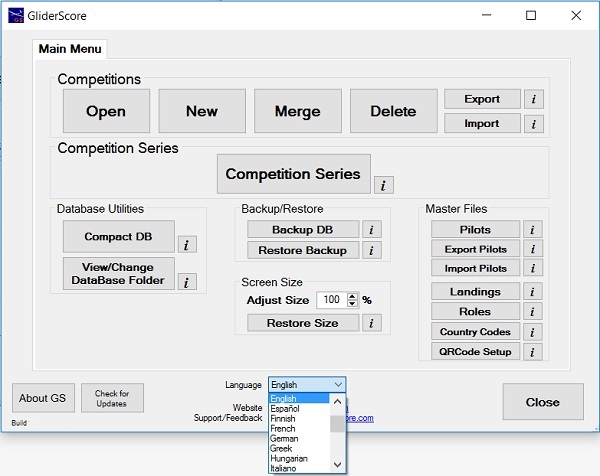
Select a language from the list and translation happens instantly.
Ukrainian is selected as an example.
It helps a lot to know somebody who can translate English words into your
language. Translation software such as Google Translate can help.
See below for an example of a translated screen and further below for
instructions on making (or editing) your own language file.
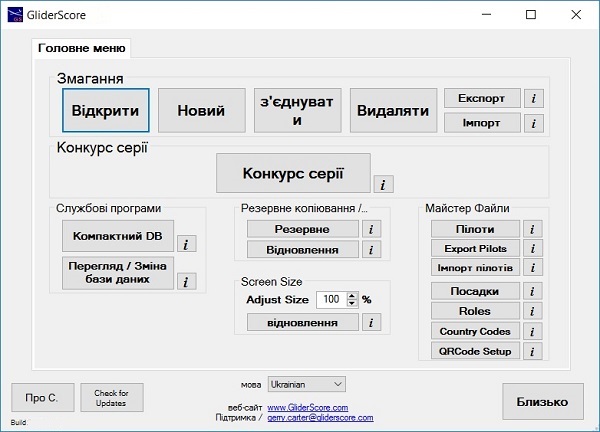
This screen was translated according to the words in the file Ukrainian.lng.
All screens are translated in a similar way.
All of the critical user interface text is available for translation and this should enable anyone to use the program.
Files are available for Chinese, Czech, Danish, Finnish, French, German, Greek, Hungarian, Italian, Japanese, Norwegian,
Russian, Slovakian, Slovenian, Spanish, Swedish, Turkish and Ukrainian as well as English.
These files are available from the Download page.
However, they are all included in the full download of GliderScore Version 6.51 (and above).
Create Your Own Language File
In fact there must be at least two language files for translation to occur.
English.lng and YourLanguage.lng.
The file 'English.lng' always exists and is re-created every time the program runs so you do not have
to do anything with it.
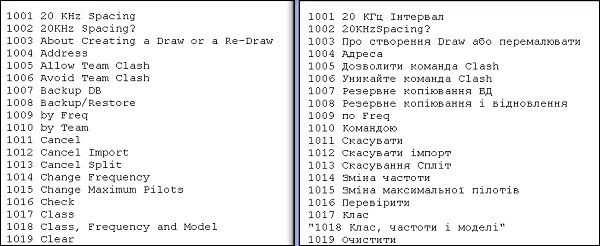
However 'English.lng' can be used as a starting point for a new language file. Just copy it to make a new file
called Mylanguage.lng.
Then replace all the english words with words in your own language.
Place your new file in the sub-folder 'Translations' (of the folder containing GliderScore.exe) and run the program. GliderScore will
add your language to the list so that you can select it. Once selected, translation takes
place for all translated words.
The numbers provide the link that enables translation.
The program takes care of limited formatting, stripping out double-quote marks,
removing leading spaces, trailing spaces and tab characters.
DOWNLOAD LANGUAGE FILES
I have created some 'starter' language files using Google Translate. I have no idea
how good (or bad) the translation is. In some cases I believe that it is quite bad,
but not always. You can and should correct the translations in these files.
COMPLETED TRANSLATIONS
Please send me your completed translations to replace the 'Google Translate' translations below.
If you send a translation file for a 'new' language I will add it to the available downloads.
All language files are included in the full download from Version 6.51 and higher.
- For Versions up to 6.50
- Download, then move files to 'C:\GliderScore6'.
- From Version 6.51
- Download, then move file/s to 'C:\GliderScore6\Translations'.
The 'Translations' folder must be a sub-folder of the folder where GliderScore.exe is located.
- Click below to download a particular language file. Translations made with
the help of 'Google Translate' have black text.
Full translations contributed by friends have
blue text. Make corrections to
the translations as needed.
- Open 'C:\GliderScore6\Translations\English.lng' to see all the English text and/or to use as a
'template' to create a new language file.
- Alternatively, download and save Translations.zip, then extract the
language/s that you need to folder C:\GliderScore6\Translations.
Translate the Information (help) text into any language
From V6.40, GliderScore information (help) text is stored in a file separate from the program file.
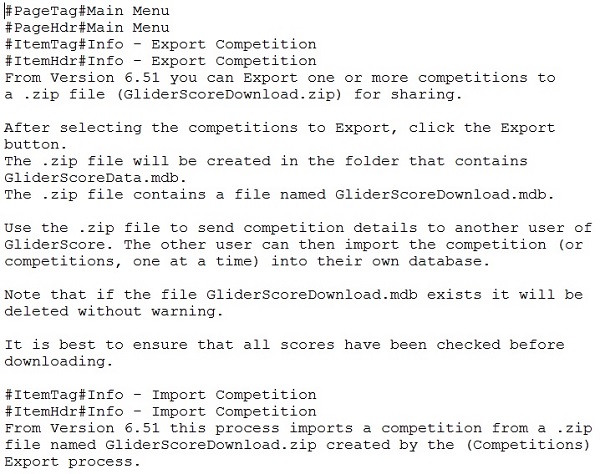
This file is called English.info.
A small sample from this file is shown on the right.
Note that a fresh copy is created every time the program starts.
The basic steps to follow to translate the Information to your language are quite straightforward.
Note that all translation files are located in a separate folder called 'Translations'.
This folder will normally be 'C:\GliderScore6\Translations'.
More specifically, it must be a sub-folder of the folder where GliderScore.exe is located.
- You must have firstly created a translation file for the menu and screen text called MyLanguage.lng.
- Make a copy of English.info and rename it MyLanguage.info.
- Make changes to your MyLanguage.info file to create the translated information.
- Do not make any changes to the lines starting with #PageTag" or #ItemTag#.
These lines are used by the program to find the required information.
The text on the lines that start with #PageHdr# and #ItemHdr# can and should be translated.
- To use your translated information (help) file, simply select your language from the list on the Main Menu.
- Note that the program will look for your file in the sub-folder 'Translations' as described above.
If not found, the English.info data will be used instead.
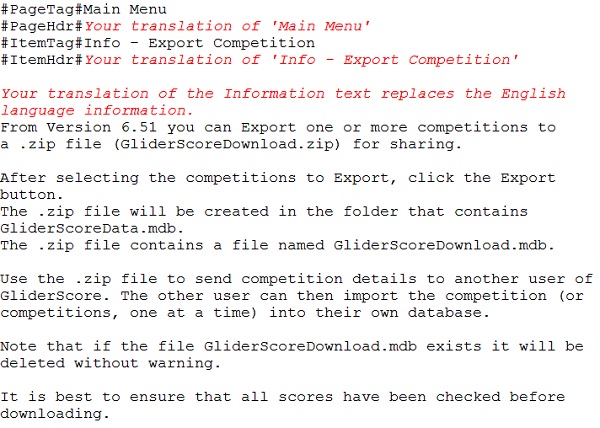
When creating a translation of the English.info file, follow the guidelines shown here.
Do not change the #PageTag# or #ItemTag# lines in any way.
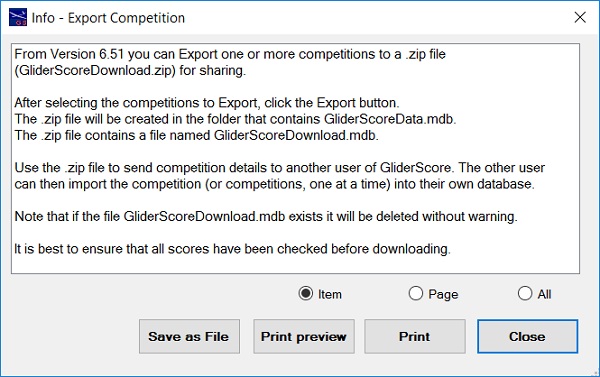
The first Information item above displays as shown on the right.