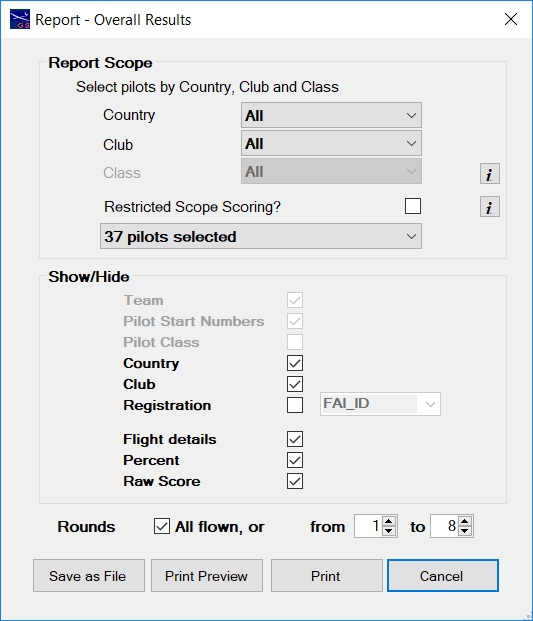
Reports - Overall Results Options
Report Scope
This report can be run for 'All' or any combination of 'Country', 'Club' or 'Class'.
The default setting is 'All'.
If the report is restricted by making a selection, the scores can be reported in one of two ways.
- Restricted Scope Scoring selected - scores are re-calculated as if the only pilots who flew were the pilots within the selection.
- Restricted Scope Scoring NOT selected - uses the same scores as for the 'All' version of the report.
Restricted Scope Scoring is useful for competitions
where, for example, only the pilots from a particular
Country qualify for a single competition National
Championship, and where it is important to remove the
effect of the flights of pilots from other countries
from the results.
Click on the drop down box that shows the number of pilots selected. You will then see the pilot names.
Show/Hide
Use the Show/Hide options to choose what is shown on your report.
See more on the 'Flight Details' option below.
Select Rounds for Report
The report can also be run for any range of rounds.
Why would you want to do this? Because longer competitions can be reported as though
they were separate competitions, with each qualifying for LSF competition points.
So a 14 round competition can be reported for rounds 1 to 7, rounds 8 to 14 and rounds 1 to 14.
If the number of rounds chosen meets the 'drop score' setting, a score will be dropped from the rounds chosen.
Any penalties recorded in the range of rounds chosen will also be taken into account.
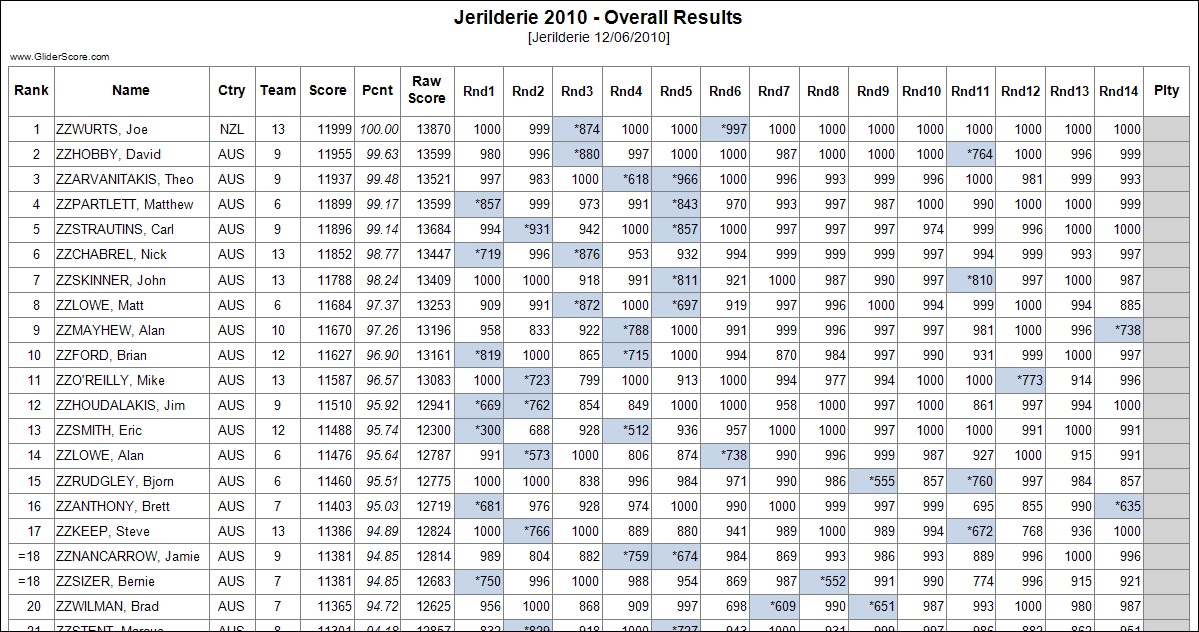
Reports - Overall Results
Show/Hide Flight Details is not ticked.
Shows overall results for the competition (including drop scores and penalties).
Pilots are ranked from first to last.
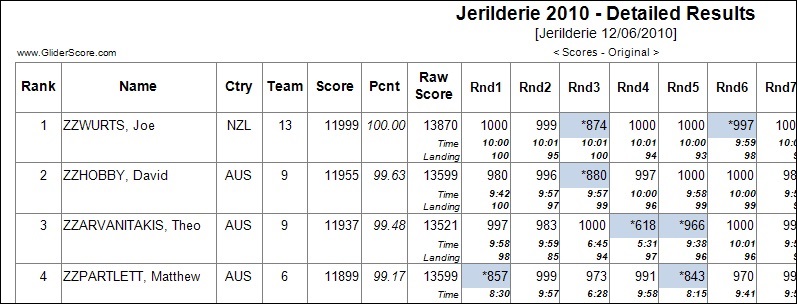
Reports - Overall Results With Flight Details
Show/Hide Flight Details is ticked.
Shows overall results with flight details for the competition (including drop scores and penalties).
Pilots are ranked from first to last.
The flight details reported depend on the competition.
For this thermal duration competition the details are flight time and landing points.
For F5J details are flight time, height in metres, landing points, 'Yes' if over 75 metres.
Other competition types are treated according to their scoring elements.
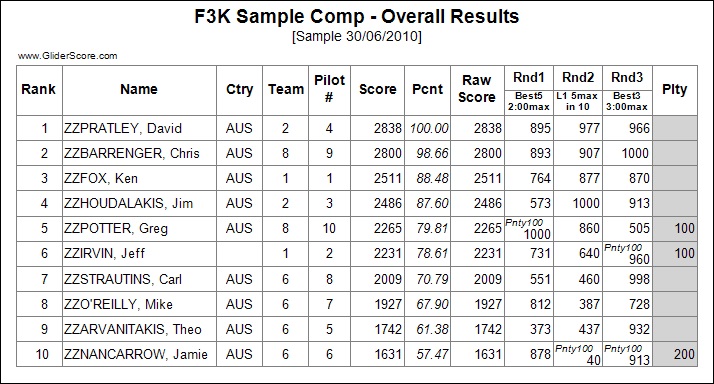
This example shows how penalties are noted both for the round and also in total.
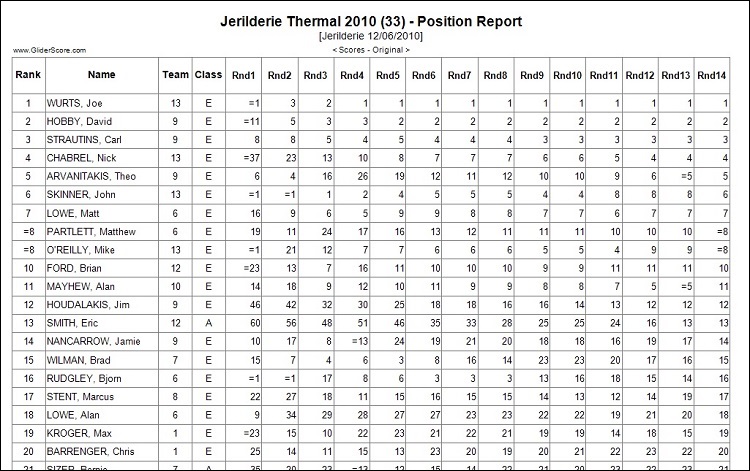
Reports - Position Report
Shows the position (ranking) of each pilot as at the end of each round.
The report is in order of the final ranking.
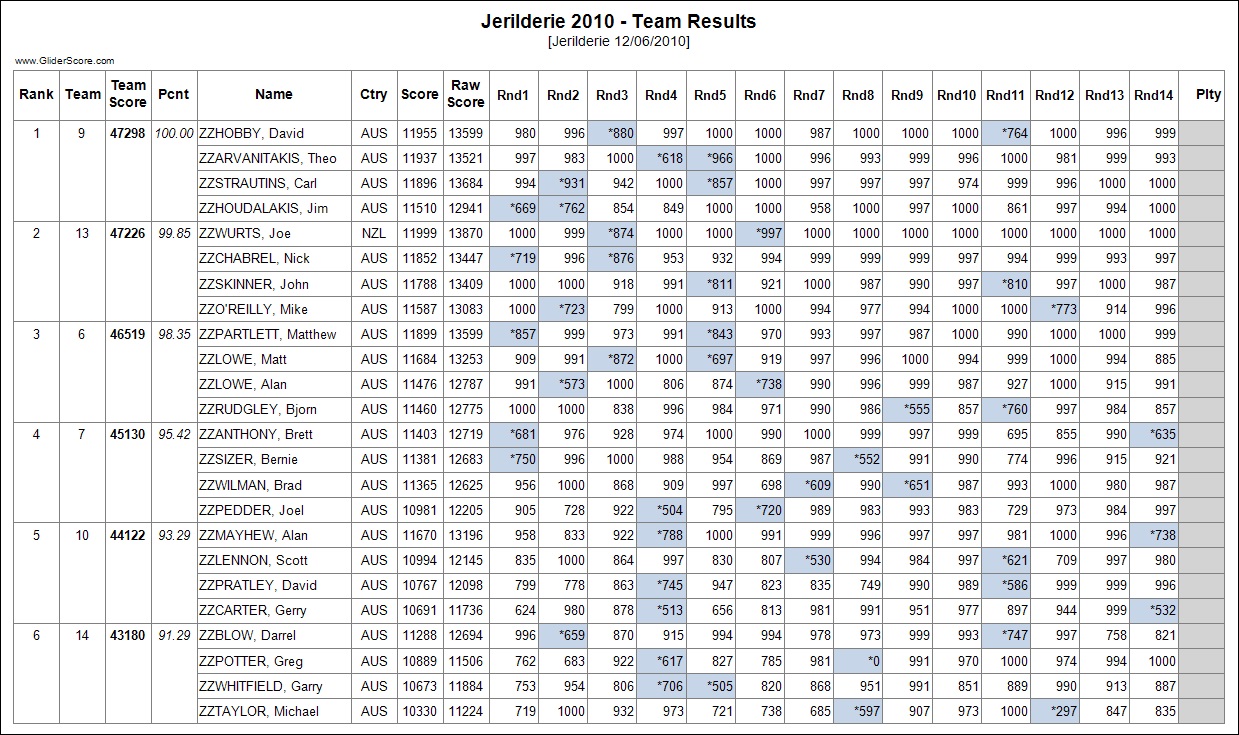
Reports - Team Results
Shows results by Team according to the number of team members to be counted for
the Team score.
This particular example report is too wide to show all columns given the number
of Rounds and the two drop scores. The Penalty column would be printed on
the next page.
Teams are ranked from first to last.
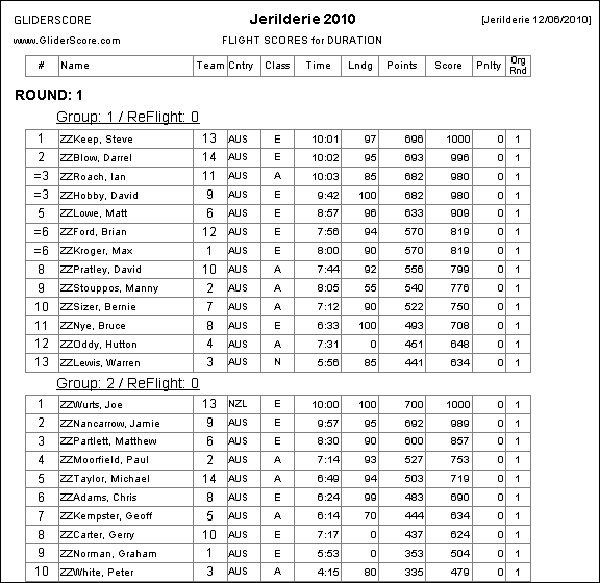
Reports - Flight Scores
Shows actual scores details for each flight group.
Pilots are ranked from first to last within each group.
The report can be run for
- the entire competition
- a range of groups
- a single group
- a selected pilot or pilots
and sorted by
Print the report for each round or for each group as the competition progresses.
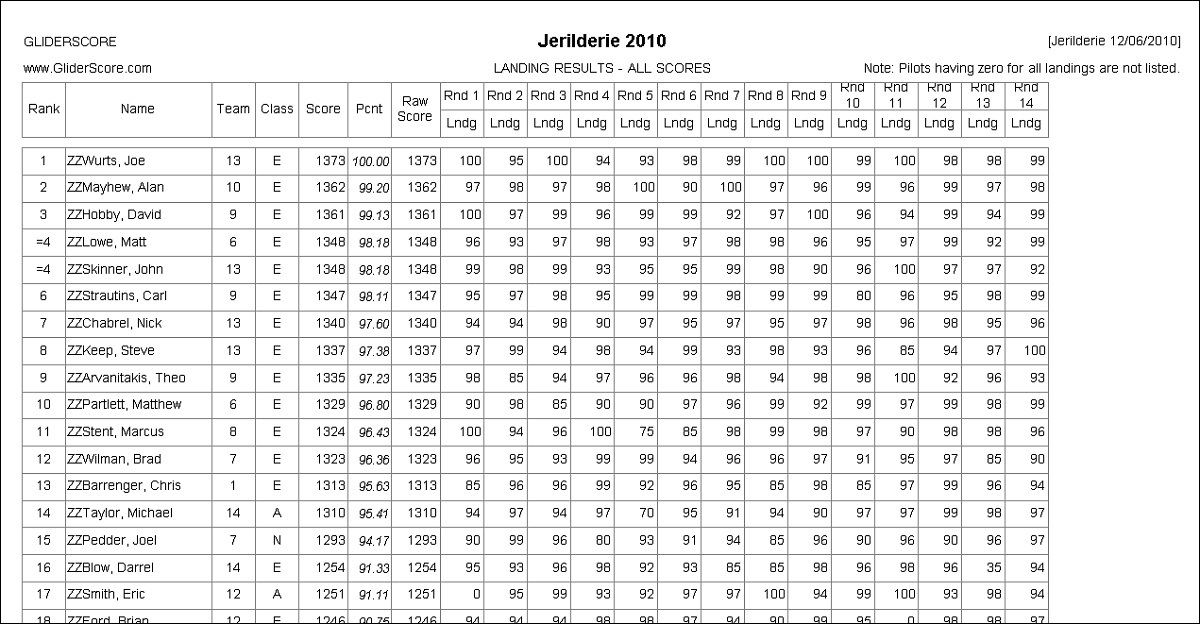
Reports - Landing Results
Shows landing points for each pilot.
All scores are counted.
Pilots are ranked from first to last.
The report can be run for
- the entire competition
- a range of groups
The report can be printed progressively as the competition progresses.
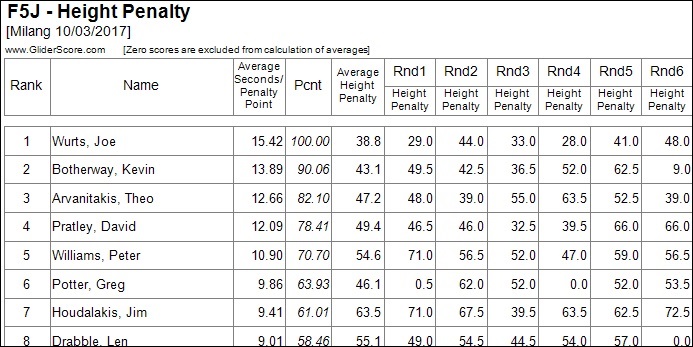
Reports - Height Penalty
The report can be run to show -
- height penalties, or
- launch heights.
Key statistics shown are based on non-zero scores
- The average flight time per penalty point, and
- The average height penalty, or
- The average flight time per metre of launch height, and
- The average launch height.
Pilots are ranked from first to last.
The report can be run for
- the entire competition
- a range of rounds
The report can be printed progressively as the competition progresses.
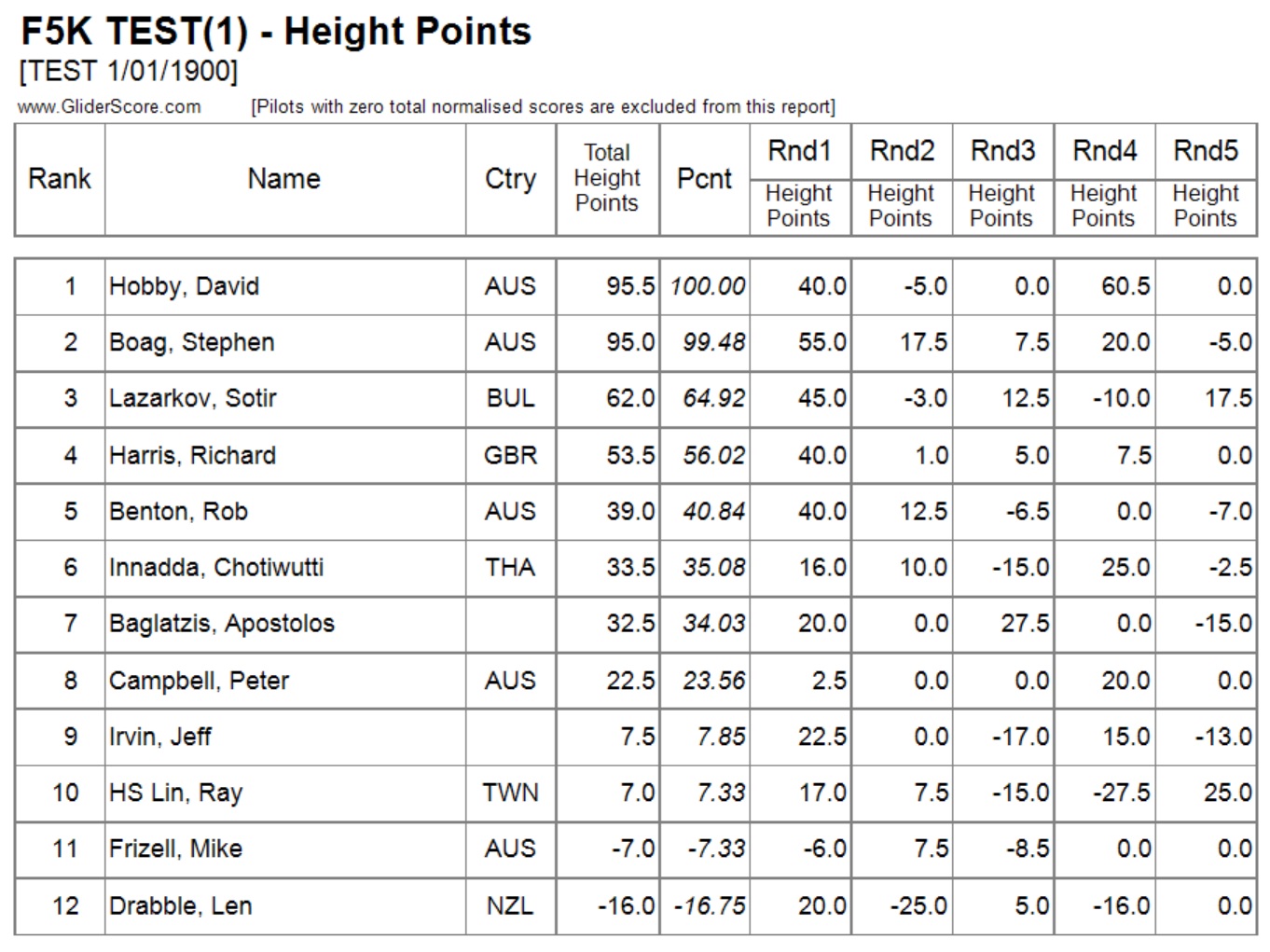
Reports - F5K Height Points
The report shows the height points for each pilot for each round ranked from first to last.
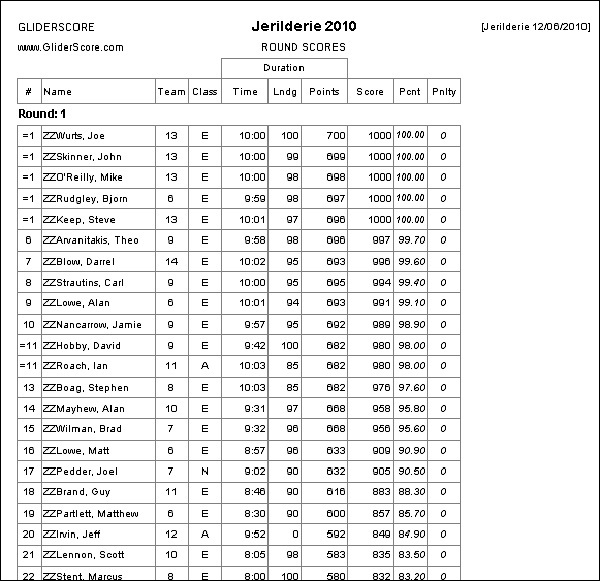
Reports - Round by Round Scores
Shows actual scores details for each Round.
Pilots are ranked from first to last within each round.
The report can be run for
- all rounds
- a range of rounds
- a single round
The report can be printed round by round as the competition progresses.